Tag: Automation

  • AI Agent for Ecommerce: How Shopify Clothing Stores Can Automate Customer Support

    AI Agent for Ecommerce: How Shopify Clothing Stores Can Automate Customer Support

    Quick Answer: An AI agent for ecommerce is an autonomous system that can answer customer questions, recommend products, support returns, check order details, and guide shoppers through buying decisions without constant human oversight. For Shopify clothing stores, the real value is not just “having a chatbot,” but building a smarter customer support and sales layer that works across the full shopping journey.

    Picture this: it is 2 AM, and someone in Tokyo is searching your store for the perfect birthday gift. At the same time, a customer in Berlin needs help processing a return, while someone in Chicago cannot decide between two product variants. Five years ago, you would need a global support team working around the clock. Today, a properly configured AI agent for ecommerce can handle all three conversations at once — and in many cases, do it faster than a tired support team after their fourth coffee.

    The shift happening right now is not just about chatbots getting smarter. We are watching ecommerce support move from simple “helpful assistant” tools into systems that can actually run meaningful parts of the customer experience: answering questions, qualifying needs, recommending products, reducing abandoned carts, and escalating complex cases to humans only when needed.

    For Shopify clothing stores, this matters even more. Fashion ecommerce has a lot of repetitive but important questions: sizing, fabric, shipping, returns, outfit matching, product availability, and “which one should I choose?” If those questions are not answered quickly, shoppers leave.

    That is where AI agents become useful.

    If you are building a more advanced ecommerce operation, this type of automation can also connect naturally with broader AI services, store automation, and custom software development workflows.

    What Is an AI Agent for Ecommerce?

    Let’s cut through the marketing noise for a second.

    An AI agent for ecommerce is not just a pop-up chat window that says “How can I help you today?” and then fails to understand a simple question. A real AI agent can use store data, product information, customer context, order status, and business rules to take useful actions or guide a customer toward the next best step.

    Traditional ecommerce chatbots usually follow fixed scripts. They wait for a trigger, match a keyword, and return a pre-written answer. That can be useful, but it is limited.

    AI agents are different because they can understand context, remember the conversation, make decisions within rules, and adapt their response based on what the customer is actually trying to do.

    Think of the difference like this:

    Traditional automation is a vending machine. Press B4, get chips.

    An AI agent is closer to a trained store employee who remembers customer preferences, notices that someone is browsing winter coats in July, understands that they might be planning a trip, and adjusts the recommendation accordingly.

    Why Shopify Clothing Stores Are a Strong Use Case

    Shopify clothing stores are one of the clearest use cases for ecommerce AI agents because customers usually need help before they buy.

    A shopper might like a product but still hesitate because of size, fit, delivery time, return rules, or uncertainty about whether the item matches something they already own. These small doubts often become abandoned carts.

    The problem is not always product quality. Sometimes the problem is silence.

    A customer asks a question. Nobody answers quickly. They leave.

    An AI agent can reduce that gap by giving immediate, useful guidance at the moment the shopper is still interested.

    For clothing stores, this can include:

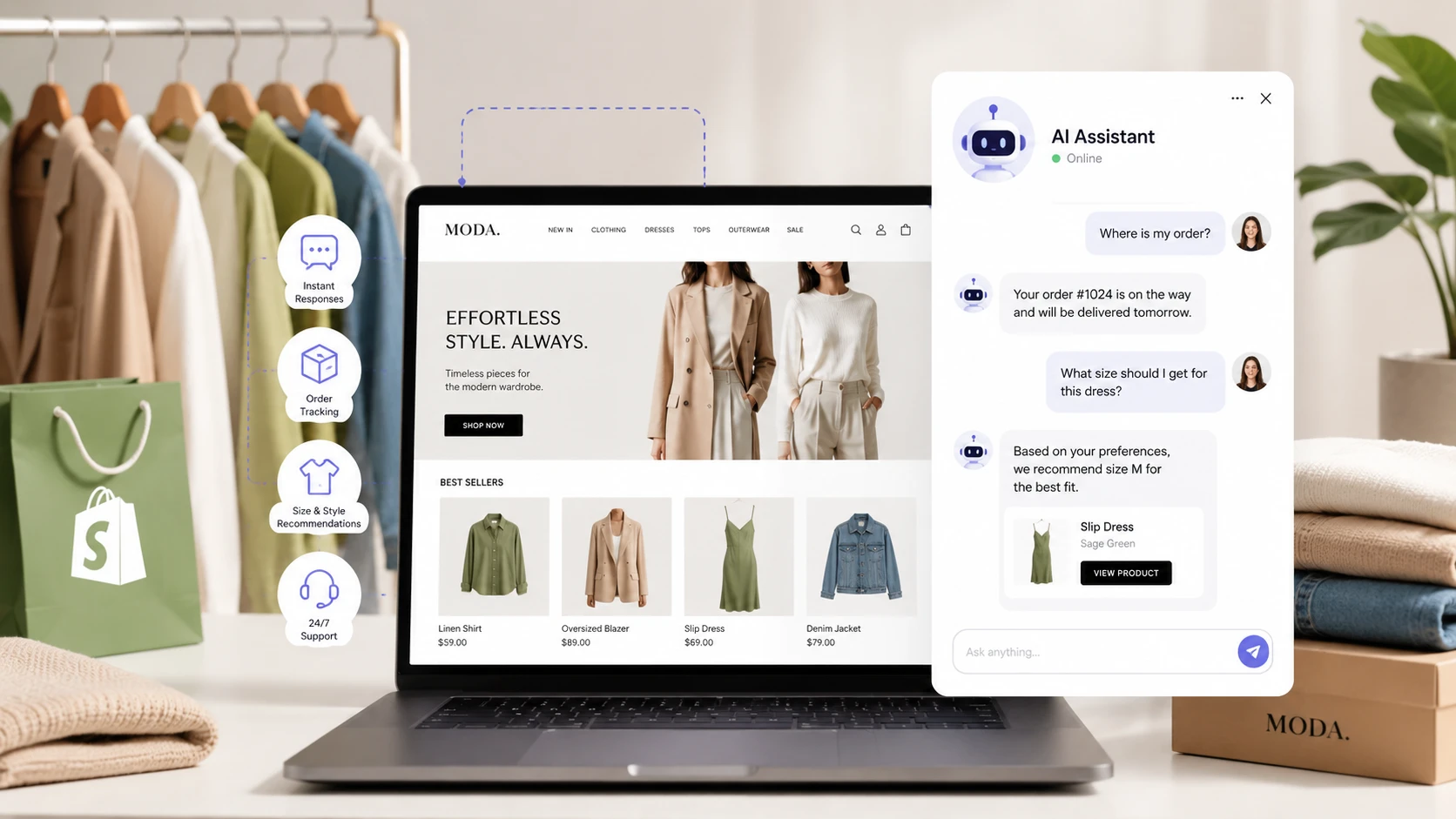
    • Size and fit guidance: Helping shoppers choose the right size based on product notes, previous purchases, or store rules.
    • Product recommendations: Suggesting similar items, matching accessories, or better alternatives when something is out of stock.
    • Return and exchange support: Explaining return rules, starting return flows, or guiding customers to the correct next step.
    • Order tracking: Checking order status and giving customers direct updates instead of sending them to a generic help page.
    • Cart recovery support: Answering last-minute doubts before the customer abandons checkout.

    This is why an AI agent for ecommerce is not just a support tool. It can become part of the sales system.

    The Core Capabilities of a Real AI Agent for Ecommerce

    Not every chatbot should be called an AI agent. The label only makes sense when the system can do more than respond with canned answers.

    A useful ecommerce AI agent usually has four core capabilities.

    1. Autonomous Decision-Making

    The agent should not need a human to approve every basic action. It should be able to answer common questions, suggest products, provide policy information, and guide routine processes on its own.

    That does not mean it should have unlimited control. It still needs boundaries. For example, it may be allowed to explain a return process, but not approve unusual refunds without human review.

    Good automation gives the agent enough freedom to be useful without letting it create business risk.

    2. Contextual Understanding

    A real AI agent should understand the customer’s situation, not just the words in one message.

    If someone asks, “Will this fit me?” while viewing a specific jacket, the agent should know which product they are looking at. If someone asks, “Can I return it?” after checking the size guide, the agent should understand the concern is probably about fit risk.

    This context is what makes the experience feel useful rather than robotic.

    3. Multi-Channel Continuity

    Customers do not always stay in one channel. They may start on live chat, continue through email, then come back later from a phone or desktop browser.

    A stronger AI agent setup can maintain context across channels, or at least make sure the handoff does not feel broken.

    That matters because customers hate repeating themselves. If they already explained the problem once, the system should not treat them like a stranger every time.

    4. Goal-Oriented Behavior

    A normal chatbot is designed to “reply.” An AI agent should be designed to achieve outcomes.

    In ecommerce, those outcomes might include:

    • Answering a question clearly.
    • Helping the customer choose the right product.
    • Reducing return risk.
    • Recovering an abandoned cart.
    • Escalating complex problems to a human quickly.

    The goal is not to automate for the sake of automation. The goal is to make the customer journey easier and the store operation more efficient.

    How an AI Agent Works Inside an Ecommerce Store

    Let’s make this practical.

    When a customer lands on your Shopify store, a properly configured AI agent can start using context before the customer even asks a question. It may consider the page being viewed, product category, cart status, browsing behavior, and previous interactions if available.

    The agent does not need to interrupt every visitor. In fact, aggressive pop-ups usually hurt the experience. A better implementation waits for useful moments: hesitation, repeated product views, cart inactivity, or direct customer questions.

    The Customer Support Automation Layer

    This is where most businesses start, and for good reason.

    AI customer support for ecommerce can handle a large percentage of routine inquiries when the system is connected to the right data sources.

    For example, when someone asks, “Where is my order?” the agent should not simply send a generic tracking page. It should check the customer’s order, identify the shipping status, and provide a clear answer.

    When someone asks about returns, the agent should explain the policy, guide the customer through the process, and hand off to a human if the case is unusual.

    This layer can reduce pressure on support teams while improving response speed for customers.

    The Product Discovery and Sales Layer

    Support is only one part of the value.

    An ecommerce AI agent can also help shoppers discover the right products. This is especially useful in clothing, accessories, beauty, electronics, and any category where customers compare options before buying.

    Instead of showing generic recommendations, the agent can ask a few simple questions and narrow the options:

    • What occasion are you buying for?
    • Do you prefer a loose or fitted style?
    • What size do you usually wear?
    • Are you looking for something casual, formal, or seasonal?

    This feels closer to assisted shopping than standard ecommerce filtering.

    For stores that want to go further, AI can also connect with tools like virtual try-on, product matching, and personalized shopping flows. This is where AI virtual try-on software becomes relevant for clothing brands that want a more visual buying experience.

    The Retention and Post-Purchase Layer

    A strong AI agent does not stop after checkout.

    Post-purchase support is one of the biggest opportunities in ecommerce automation. The agent can help with tracking, delivery questions, return instructions, review requests, reorder reminders, and product care guidance.

    This is not always glamorous, but it has a direct impact on customer satisfaction.

    A shopper who gets quick help after buying is more likely to trust the store again.

    What AI Agents Can Automate in a Shopify Clothing Store

    For a Shopify clothing store, the most practical use cases are usually simple, repetitive, and high-volume.

    Here are the areas where an AI agent can make a visible difference.

    Product Questions

    Customers often ask about fabric, fit, measurements, colors, washing instructions, availability, or whether an item matches another product.

    If your product data is organized properly, the AI agent can answer these questions quickly without waiting for a human.

    This is one of the easiest areas to automate because the answers usually already exist somewhere in your product descriptions, size guides, policies, or internal notes.

    Size Guidance

    Sizing is one of the biggest friction points in fashion ecommerce.

    An AI agent can guide customers through size selection by asking structured questions and referencing your size chart. It can also explain whether an item runs small, large, fitted, oversized, or true to size if that information exists in your store data.

    This does not eliminate returns completely, but it can reduce avoidable mistakes.

    Order Tracking

    Customers asking “Where is my order?” are not trying to have a conversation. They want a fast answer.

    An AI agent connected to order and shipping data can provide that answer instantly. This saves time for both the customer and the support team.

    Returns and Exchanges

    Returns are repetitive, but they must be handled carefully.

    The agent can explain the return window, check eligibility, guide the customer through the steps, and collect the required information. For unusual cases, it can escalate to a human with the context already prepared.

    Abandoned Cart Recovery

    Sometimes a shopper abandons a cart because of a question that was never answered.

    An AI agent can help before that happens. If a customer is stuck on a product page or checkout step, the agent can offer specific help instead of generic discount pop-ups.

    For example:

    • “Need help choosing the right size?”
    • “Want to compare this with a similar item?”
    • “Looking for delivery information before checkout?”

    This is more useful than shouting “10% off” at every visitor.

    Common Myths About AI Agents for Ecommerce

    Let’s address a few myths that still create confusion.

    Myth 1: AI Agents Will Replace All Human Support Staff

    No. At least, not in a healthy setup.

    What usually happens is that the support team stops answering the same basic questions all day and starts handling the cases that actually need human judgment.

    The agent handles volume. Humans handle nuance.

    That means your best support people can focus on difficult customers, sensitive cases, high-value orders, and improving the customer experience instead of repeating “Here is our return policy” for the hundredth time.

    Myth 2: You Can Set It and Forget It

    Also no.

    An AI agent for ecommerce needs training, monitoring, and refinement. It is closer to having a smart assistant that learns quickly but still needs guidance on your policies, tone, product logic, and escalation rules.

    You will still need to review edge cases, improve product data, update policies, and adjust the agent’s behavior based on real conversations.

    It is less work than scaling a large support team, but it is not zero work.

    Myth 3: Only Big Brands Can Afford This

    This used to be more true than it is now.

    Small and mid-sized ecommerce stores are often strong candidates because they feel the pain of support volume earlier. They may not have the budget for a large customer service team, but they still need fast answers and consistent support.

    The key is choosing the right implementation level. Not every store needs a complex custom agent on day one.

    The Right Way to Implement an AI Agent

    The safest approach is not to automate everything at once.

    Smart stores start with one controlled use case, prove value, and then expand.

    Phase 1: After-Hours Support

    A simple first step is to deploy the AI agent outside business hours.

    Your human team continues handling normal daytime support, while the agent covers nights, weekends, and time zones your team cannot reach easily.

    This gives you a lower-risk way to test quality, train the system, and discover common gaps.

    Phase 2: Tier-1 Questions During Business Hours

    Once the agent performs well, it can start handling simple questions during normal hours too.

    These might include:

    • Order tracking.
    • Return policy questions.
    • Basic product information.
    • Size guide explanations.
    • Shipping time questions.

    Humans should remain available for escalations.

    Phase 3: Sales Assistance and Personalization

    After support automation is stable, the next step is sales assistance.

    This is where the agent starts helping shoppers choose products, compare options, and receive better recommendations.

    At this stage, the agent becomes part of the revenue system, not just the support system.

    Integration Requirements You Should Check First

    Before choosing any AI agent platform, check whether it can actually connect to the systems your store already uses.

    This is where many ecommerce AI projects succeed or fail.

    A nice demo is not enough. The agent needs reliable access to the right data, and it needs clear rules for what it can and cannot do.

    Essential Integrations

    At minimum, an AI agent for ecommerce usually needs access to:

    • Your ecommerce platform: Shopify, WooCommerce, or a custom store backend.
    • Product catalog: Product titles, descriptions, variants, images, stock status, and pricing.
    • Order data: Order status, customer details, payment status, and fulfillment updates.
    • Shipping tools: Tracking numbers, carrier updates, delivery estimates, and failed delivery notes.
    • Store policies: Returns, refunds, shipping rules, exchanges, warranty, and support terms.

    Without these connections, the agent becomes a smarter FAQ tool. With them, it becomes a real operational assistant.

    Advanced Integrations

    More advanced stores may also connect the agent to:

    • CRM systems.
    • Email marketing tools.
    • Loyalty programs.
    • Inventory management systems.
    • Analytics platforms.
    • ERP or custom internal systems.

    This is where custom software development may become necessary, especially if your store uses custom workflows that standard apps cannot handle cleanly.

    How to Choose the Right AI Agent for Ecommerce

    The market is full of tools calling themselves AI agents, AI chatbots, AI assistants, or customer support automation platforms. The names are less important than what the system can actually do.

    Here are the criteria that matter.

    1. Can It Take Real Actions?

    There is a big difference between a tool that says, “You can return your item from the returns page,” and a tool that can actually start the return process.

    The more actions the agent can safely perform, the more valuable it becomes.

    Useful actions might include:

    • Checking order status.
    • Starting a return request.
    • Recommending available products.
    • Collecting customer details before escalation.
    • Creating a support ticket.
    • Sending a product or policy link.

    Start with safe actions first, then expand gradually.

    2. How Does It Learn Your Store?

    Some AI tools require heavy manual setup. Others can learn from your product catalog, help center, policy pages, previous support conversations, and internal documents.

    Both approaches can work, but you need to know what is required before you start.

    For a clothing store, the agent should understand:

    • Product categories.
    • Size guides.
    • Fabric and material details.
    • Shipping rules.
    • Return policy details.
    • Brand tone and style.

    Poor training creates vague answers. Good training creates a useful assistant.

    3. Does It Escalate Properly?

    Escalation is one of the most important parts of ecommerce AI support.

    A bad AI agent keeps guessing when it should stop. A good AI agent knows when to bring in a human.

    Escalation should happen when:

    • The customer is angry or frustrated.
    • The case involves payment problems.
    • The agent is not confident.
    • The request is outside the store’s policy.
    • The customer asks for a human.
    • The order value or risk level is high.

    The handoff should include the conversation history so the human support agent does not need to ask the customer to repeat everything.

    4. Can You Control the Brand Voice?

    Your AI agent should not sound like a generic corporate robot.

    If your brand is playful, the agent should feel friendly and light. If your brand is premium, it should feel polished and calm. If your audience is technical, it can be more direct and detailed.

    Brand voice matters because the AI agent becomes part of the customer experience. Customers may not analyze the tone consciously, but they will feel when something is off.

    Risks and Limitations You Should Not Ignore

    AI agents can be powerful, but they are not magic. There are real risks, and pretending they do not exist is how bad implementations happen.

    Incorrect Answers

    AI systems can sometimes generate confident answers that are wrong. In ecommerce, that can mean incorrect product details, wrong delivery expectations, or policy confusion.

    The solution is to ground the agent in verified store data, restrict risky actions, and create clear escalation rules.

    Weak Product Data

    If your product data is messy, the AI agent will struggle.

    For example, if size charts are inconsistent, product descriptions are thin, and return rules are unclear, the agent has weak material to work with.

    Before blaming the AI, check the data.

    Over-Automation

    Not every customer interaction should be automated.

    Some situations need empathy, negotiation, or human judgment. If the agent blocks customers from reaching a human, it can damage trust quickly.

    The goal is not to hide your support team. The goal is to let the AI handle repetitive work while humans handle the cases that deserve human attention.

    Privacy and Compliance

    An ecommerce AI agent may process customer names, order information, messages, browsing behavior, and purchase history.

    That means privacy matters.

    You need to understand how the platform stores data, whether it uses customer conversations for training, what security controls exist, and whether it supports relevant privacy requirements in your market.

    For broader context on ecommerce AI use cases, Shopify’s guide to AI in ecommerce is a useful industry reference.

    How to Measure Success

    Do not judge an AI agent only by how many messages it sends. That number alone does not mean much.

    Measure whether it improves the business.

    Support Metrics

    Start with operational metrics:

    • Response time: How quickly customers get a useful answer.
    • Resolution rate: How many conversations are solved without human intervention.
    • Escalation rate: How often the agent needs a human.
    • Customer satisfaction: Whether customers are happy with the answer.
    • Support workload: Whether repetitive tickets decrease.

    These metrics tell you if the agent is actually helping your support process.

    Sales Metrics

    For ecommerce, support is only part of the picture.

    You should also look at:

    • Conversion rate.
    • Cart abandonment rate.
    • Average order value.
    • Repeat purchase rate.
    • Revenue from assisted sessions.

    A good AI agent can improve sales by answering objections at the right moment, helping customers choose, and making the buying process feel easier.

    When an AI Agent Is Worth It — and When It Is Not

    An AI agent for ecommerce is not necessary for every store.

    It is usually worth exploring if:

    • You receive repeated customer questions every week.
    • Your team spends too much time answering basic support tickets.
    • You sell products that require explanation or comparison.
    • Your store serves customers in different time zones.
    • You lose sales because shoppers do not get quick answers.
    • You are scaling and support costs are growing with revenue.

    You may want to wait if:

    • Your store has very little traffic.
    • Your product data is incomplete or messy.
    • Your policies change constantly.
    • You do not have anyone who can monitor and improve the system.

    The technology is no longer experimental, but it still needs a responsible setup.

    Final Thoughts

    An AI agent for ecommerce is not just a trend or a fancy chatbot. When implemented properly, it becomes a practical layer between your customers, products, policies, and support team.

    For Shopify clothing stores, the opportunity is clear. Customers need help with size, fit, availability, shipping, returns, and product choices. If those questions are answered quickly and naturally, the store has a better chance of converting visitors into buyers.

    The right approach is not to automate everything overnight. Start with the repetitive support questions. Connect the agent to reliable store data. Set clear escalation rules. Then expand into product recommendations, cart recovery, and post-purchase automation.

    Done well, an AI agent does not replace the human side of ecommerce. It protects it by removing repetitive work and giving people more time for the conversations that actually need them.

    If you want to build a more advanced customer support or ecommerce automation system, JustOnePrompt can help connect AI agents with Shopify workflows, store data, and custom automation logic through AI services and store automation.

    Frequently Asked Questions

    What is an AI agent for ecommerce?

    An AI agent for ecommerce is an autonomous system that helps customers across the buying journey. It can answer questions, recommend products, support returns, check order information, and escalate complex issues to humans when needed.

    How is an AI agent different from a normal ecommerce chatbot?

    A normal chatbot usually follows fixed scripts or simple keyword rules. An AI agent can understand context, use store data, make decisions within defined rules, and guide customers toward useful outcomes.

    Do Shopify clothing stores really need an AI agent?

    Not every store needs one immediately, but Shopify clothing stores with repeated questions about sizing, returns, shipping, product recommendations, or order tracking can benefit from an AI agent because it reduces response time and helps customers make buying decisions.

    Can an AI agent increase ecommerce sales?

    Yes, when implemented well. An AI agent can increase sales by answering product questions quickly, reducing abandoned carts, recommending relevant products, and helping customers feel more confident before checkout.

    Will an AI agent replace human support?

    Usually no. The best setup uses AI agents for repetitive questions and routine workflows, while human support handles complex, emotional, sensitive, or high-value cases.

    How long does it take to implement an AI agent in a Shopify store?

    A basic implementation can take a few days if the store uses standard Shopify apps and clear policies. A more advanced setup with custom workflows, integrations, and brand-specific training may take several weeks.

    What should I prepare before using an ecommerce AI agent?

    You should prepare clear product data, size guides, return policies, shipping rules, support FAQs, escalation rules, and examples of your brand voice. The better your data, the better the AI agent will perform.
  • Ecommerce Cloud Computing: Do Shopify Automation Tools Need VPS Hosting?

    Ecommerce Cloud Computing: Do Shopify Automation Tools Need VPS Hosting?

    “`html

    Quick Answer: Ecommerce cloud computing delivers scalable infrastructure, platforms, and software over the internet, enabling online retailers to handle traffic spikes, reduce upfront costs, and deploy new features quickly without managing physical servers.

    Why Your Online Store Shouldn’t Live in a Basement Server Room

    Picture this: It’s Black Friday morning, your online store is running on a server tucked in the back office, and suddenly 10,000 shoppers hit “buy now” simultaneously. The server wheezes, the site crawls to a halt, and you’re left frantically refreshing the admin panel while orders evaporate into the ether.

    This nightmare scenario used to be the reality for ecommerce businesses before cloud computing arrived. Today, the intersection of online retail and cloud technology has fundamentally reshaped how digital storefronts operate. No more scrambling to buy extra servers every holiday season or praying your infrastructure can handle a viral product launch.

    The shift toward ecommerce cloud computing isn’t just a tech trend—it’s become the operational backbone that separates thriving online retailers from those stuck troubleshooting hardware at 3 AM. Let’s break down exactly how this transformation happened and what it means for anyone selling stuff online.

    What Ecommerce Cloud Computing Actually Means (No Jargon, Promise)

    At its core, cloud computing for ecommerce means renting computing power, storage, and services from massive data centers instead of owning and maintaining your own equipment. Think of it like the difference between owning a car (buying servers) versus using Uber (renting cloud resources)—you get where you need to go without the maintenance headaches.

    Three main service models power most online stores:

    • IaaS (Infrastructure as a Service): Virtual servers and storage you control. You pick the operating system, install your ecommerce platform, and manage everything except the physical hardware.
    • PaaS (Platform as a Service): Pre-configured development environments where you deploy your applications without worrying about servers, security patches, or scaling configurations.
    • SaaS (Software as a Service): Complete ecommerce platforms accessible through a browser—just add products, customize your storefront, and start selling.

    The model you choose depends on how much control you need versus how much infrastructure management you wanna handle yourself. A small boutique might thrive with SaaS simplicity, while a high-traffic retailer with custom requirements might need the flexibility of IaaS or VPS hosting for ecommerce with automated workflows.

    The Real Players Behind Your Favorite Online Stores

    Amazon Web Services (AWS) dominates this space, which makes sense given Amazon basically invented modern cloud infrastructure while solving their own ecommerce challenges. Microsoft Azure and Google Cloud Platform also provide robust ecommerce solutions, each with unique strengths.

    Smaller specialized providers focus exclusively on ecommerce needs, offering pre-optimized environments for platforms like Magento, WooCommerce, or Shopify Plus. These niche players understand retail-specific challenges like PCI compliance, seasonal traffic patterns, and integration with payment processors.

    Why Cloud Computing Became Ecommerce’s Best Friend

    Here’s the simple version: cloud computing solved three massive problems that used to keep ecommerce operators awake at night—scalability nightmares, reliability concerns, and astronomical upfront costs.

    Elastic Scalability (AKA Your Site Won’t Crash During Sales)

    Traditional hosting meant guessing your maximum traffic six months in advance and paying for that capacity whether you used it or not. Cloud infrastructure automatically provisions additional resources when traffic surges, then scales back down when things quiet down.

    During Cyber Monday, your site might need 50 servers to handle demand. On a random Tuesday in February, maybe five servers suffice. With cloud computing, you pay for what you actually use rather than maintaining peak capacity year-round sitting idle.

    This elasticity extends beyond just web servers. Database performance, content delivery networks, image processing, search functionality—every component scales independently based on real-time demand.

    Reliability Through Redundancy

    Cloud providers distribute your ecommerce platform across multiple servers in different geographic locations. If one server fails (and they do fail), traffic automatically routes to healthy servers without customers noticing anything wrong.

    Compare this to the old model where a single server failure meant your entire store went dark until someone physically fixed the problem. The distributed nature of cloud computing essentially builds insurance against hardware failures directly into teh infrastructure.

    From Capital Expenses to Operating Expenses

    Launching an online store used to require significant upfront investment in servers, networking equipment, backup systems, and climate-controlled server rooms. Cloud computing converts these capital expenses into predictable monthly operational costs.

    For startups and small retailers, this shift is transformative. You can launch with enterprise-grade infrastructure for a few hundred dollars monthly rather than tens of thousands upfront. As revenue grows, infrastructure costs scale proportionally.

    How Cloud Infrastructure Powers Modern Online Shopping

    Let’s pause for a sec and talk about what’s actually happening behind the scenes when someone clicks “Add to Cart” on a cloud-hosted ecommerce site.

    The customer’s request hits a load balancer that distributes incoming traffic across multiple web servers. These servers pull product data from cloud databases, retrieve product images from object storage, and check inventory levels in real-time. Payment processing happens through encrypted connections to payment gateways, and order confirmations trigger automated workflows across fulfillment systems.

    All of this happens in milliseconds, orchestrated across dozens or hundreds of servers that might be physically located across multiple continents. The cloud provider handles the complexity of coordinating these distributed systems.

    The Customer Experience Advantage

    Page load speed directly impacts conversion rates. Cloud providers operate massive content delivery networks (CDNs) that cache your product images, stylesheets, and static content on servers close to your customers. A shopper in Tokyo loads images from a Tokyo data center, while someone in London pulls from European servers.

    Personalization engines running on cloud infrastructure analyze browsing behavior, purchase history, and preferences in real-time to customize product recommendations. These AI-powered systems require substantial computing power that would be impractical for individual retailers to maintain on-premises.

    Omnichannel experiences—where customers seamlessly move between mobile apps, websites, and physical stores—rely on cloud infrastructure to synchronize inventory, preferences, and shopping carts across all touchpoints. For more insights on managing complex cloud infrastructures, explore this detailed overview of ecommerce cloud fundamentals.

    Common Misconceptions About Cloud-Based Ecommerce

    Despite widespread adoption, several myths persist about cloud computing for online retail. Let’s clear up the most common ones.

    Myth: Cloud Hosting Is Less Secure Than On-Premises

    In plain English: major cloud providers invest billions in security infrastructure that individual retailers could never match. They employ dedicated security teams, maintain compliance certifications (PCI DSS, SOC 2, ISO 27001), and implement advanced threat detection systems.

    The security concern typically stems from not understanding the shared responsibility model. Cloud providers secure the infrastructure; retailers remain responsible for securing their applications, data access controls, and user credentials.

    Myth: You Lose Control of Your Data

    Cloud providers store your data, but you retain full ownership and control. You can export your data anytime, control who accesses it, and choose which geographic regions store it for compliance with data residency regulations.

    Most cloud contracts explicitly state that your data belongs to you, and providers cannot access it without your permission except in specific legal circumstances.

    Myth: Cloud Computing Is Always Cheaper

    For most ecommerce businesses, cloud infrastructure reduces total cost of ownership significantly. However, extremely large retailers with predictable, consistent traffic patterns might find dedicated infrastructure more cost-effective.

    The financial advantage of cloud computing comes from eliminating waste—paying only for resources you use, avoiding over-provisioning, and eliminating the hidden costs of maintaining infrastructure (power, cooling, physical security, hardware replacement).

    Real-World Implementation: How Retailers Actually Use Ecommerce Cloud Computing

    Theory is nice, but let’s talk about how online retailers actually leverage cloud infrastructure in their daily operations.

    Startup Scenario: Launch Fast, Iterate Faster

    A new fashion retailer launches using a SaaS ecommerce platform hosted entirely in the cloud. Within days, they have a functioning online store without writing a single line of server configuration code. As the brand gains traction, they add cloud-based inventory management, email marketing automation, and customer service tools—all integrating seamlessly through APIs.

    When an Instagram influencer unexpectedly features their products, traffic spikes 50x overnight. The cloud infrastructure automatically scales to handle demand without the founders doing anything. No frantic calls to hosting providers, no emergency server purchases.

    Mid-Size Retailer: Omnichannel Integration

    An established retailer with physical stores and an online presence uses PaaS solutions to build custom applications connecting all sales channels. Cloud-based inventory systems provide real-time stock visibility across warehouses, stores, and online listings.

    Customers can check if products are available at nearby stores through the website, buy online and pick up in-store, or return online purchases at physical locations. All these capabilities rely on cloud infrastructure synchronizing data across systems in real-time.

    Enterprise Example: Global Expansion Without Infrastructure Investment

    A large international retailer expands into new markets by deploying regional instances of their ecommerce platform in cloud data centers near target customers. This approach reduces latency, ensures compliance with local data regulations, and provides better customer experiences without building physical infrastructure in each country.

    During regional holidays or events, they allocate additional computing resources to specific geographic deployments, then reallocate those resources to different regions as demand shifts. This global resource optimization would be impossible with traditional infrastructure.

    Choosing Your Cloud Strategy: Practical Considerations

    Selecting the right cloud approach depends on several factors specific to your ecommerce operation. Technical expertise available in-house plays a major role—IaaS offers maximum flexibility but requires skilled DevOps personnel to manage effectively.

    Budget considerations extend beyond monthly hosting costs. Calculate the total cost including development time, maintenance, security compliance, and potential downtime. Sometimes paying more for managed services saves money compared to hiring full-time infrastructure specialists.

    Compliance requirements might dictate certain cloud configurations. Healthcare products, financial services, or businesses operating in heavily regulated industries need providers with specific certifications and the ability to implement required security controls.

    What’s Next: The Future of Cloud-Powered Ecommerce

    The integration of ecommerce cloud computing continues evolving rapidly. Emerging trends include edge computing bringing processing power even closer to customers, AI-powered personalization engines that understand shopping intent, and serverless architectures that eliminate server management entirely.

    Voice commerce, augmented reality product visualization, and real-time video shopping experiences all depend on cloud infrastructure providing the computing power and global distribution required for these bandwidth-intensive features.

    For retailers just starting their cloud journey, the path forward is clearer than ever: start with managed solutions that handle infrastructure complexity, then gradually adopt more sophisticated cloud services as your team’s capabilities and business requirements grow. The barrier to entry has never been lower, and the competitive advantages have never been more significant.

    If you’re ready to dive deeper into technical implementation, consider exploring strategies for automating deployment processes and managing multi-cloud environments efficiently.

    FAQ: Ecommerce Cloud Computing Essentials

    What is ecommerce cloud computing?

    Ecommerce cloud computing is the delivery of online retail infrastructure, platforms, and software through internet-based services rather than physical hardware owned by the retailer. It enables scalable, flexible operations without managing servers directly.

    How does VPS hosting for ecommerce differ from traditional cloud services?

    VPS hosting provides dedicated virtual server resources with more control than shared hosting but less scalability than full cloud platforms. It offers a middle ground between affordability and customization for growing ecommerce businesses.

    What are the main cost benefits of cloud computing for online stores?

    Cloud computing eliminates upfront hardware investments, converts fixed infrastructure costs to variable expenses based on usage, and reduces staffing needs for server maintenance. You pay only for resources consumed during actual traffic and processing demands.

    Is cloud hosting secure enough for storing customer payment information?

    Major cloud providers maintain PCI DSS compliance and implement enterprise-grade security measures exceeding what most individual retailers could achieve. Security responsibility is shared between the provider (infrastructure) and retailer (application and data access controls).

    Can I migrate my existing ecommerce site to the cloud?

    Yes, most ecommerce platforms can migrate to cloud infrastructure through phased approaches that minimize downtime. The complexity depends on your current architecture, integrations, and whether you’re moving to IaaS, PaaS, or SaaS solutions.

    “`

  • SendPulse vs Mailchimp for Ecommerce: Which Platform Wins?

    SendPulse vs Mailchimp for Ecommerce: Which Platform Wins?

    SendPulse vs Mailchimp: SendPulse is emerging as a strong Mailchimp alternative, offering comparable features at lower pricing with slightly better usability scores, while Mailchimp maintains advantages in design quality and analytics—making your choice dependent on whether budget flexibility or established reliability matters more.

    Why I’m Even Writing This Comparison

    Let me tell you about Sarah, a small business owner who woke up one morning to find her Mailchimp bill had nearly doubled. She wasn’t sending more emails. She hadn’t added features. The pricing structure had just… evolved. And not in her favor.

    Sound familiar? You’re not alone. Thousands of businesses are currently staring at their email marketing invoices, wondering if there’s a better way. The good news? There might be.

    Mailchimp built its empire on simplicity and accessibility, but lately, the cost conversation has gotten loud. Really loud. Enter SendPulse—a platform that’s been quietly building features while keeping prices competitive. But is it actually better, or just cheaper?

    What Makes SendPulse vs Mailchimp Worth Your Attention

    Here’s the thing about email marketing platforms: they’re kinda like gym memberships. Everyone needs one, most people overpay for features they never use, and switching feels like a massive hassle.

    But the email marketing landscape has shifted. What worked five years ago—when Mailchimp was the undisputed champion—doesn’t necessarily serve today’s businesses, especially ecommerce brands juggling tight margins and complex automation needs.

    Both platforms handle the basics: email campaigns, automation, subscriber management. Where they diverge is in pricing philosophy, feature depth, and who they’re really designed to serve. Let’s break down what actually matters.

    The Real Difference in the SendPulse vs Mailchimp Debate

    SendPulse positions itself as the Swiss Army knife of digital marketing. Beyond email, you get SMS, web push notifications, chatbots, and even landing pages with payment integrations—all under one roof. Mailchimp started as email-first but has evolved into a broader marketing platform with CRM capabilities and enhanced analytics.

    For ecommerce businesses specifically, this distinction matters. A Mailchimp alternative for ecommerce needs to handle product recommendations, abandoned cart sequences, and purchase behavior triggers without requiring a computer science degree to set up.

    Feature Showdown: Where Each Platform Shines

    Usability: The Daily Driver Experience

    According to G2 reviewers, SendPulse edges ahead slightly in ease of setup and day-to-day use. But—and this is important—some users report that SendPulse’s editor can feel buggy or slow compared to alternatives. Not a dealbreaker, but worth knowing if you’re the type who gets irrationally angry at loading spinners.

    Mailchimp’s interface has that polished, tested-by-millions feel. Everything is where you expect it to be, which matters when you’re trying to bang out a campaign at 11 PM before a product launch.

    The verdict? If you value predictability and polish, Mailchimp wins. If you want slightly faster onboarding and don’t mind occasional quirks, SendPulse holds its own.

    Functionality: What’s Actually Under the Hood

    SendPulse brings some genuinely useful tools that Mailchimp doesn’t bundle in:

    • Built-in email verification: Clean your list before sending, reducing bounce rates without paying for a third-party service
    • Spam checking: Preview how your email scores against spam filters before hitting send
    • Landing pages with payment integration: Accept payments directly from landing pages—huge for ecommerce brands testing new products
    • Multi-channel automation: Combine email, SMS, and web push in a single workflow

    Mailchimp counters with:

    • Superior design templates: More polished, conversion-tested templates out of the box
    • Robust analytics: Deeper reporting and revenue attribution, especially for ecommerce integrations
    • Reliable delivery: Battle-tested infrastructure that consistently lands in inboxes
    • Extensive app marketplace: More third-party integrations than you can shake a stick at

    For agencies managing multiple clients, SendPulse’s flexibility gets high marks. One agency reviewer noted: “We are very happy with SendPulse, and so are our clients”—praising both features and pricing structure.

    If you’re exploring other automation tools beyond email marketing, you might find value in Python vs n8n: Which is Better? for understanding workflow automation options.

    The Elephant in the Room: Pricing

    Let’s talk money, because this is where the sendpulse vs mailchimp conversation gets spicy.

    Multiple sources consistently cite Mailchimp’s increasing costs as a primary reason businesses start exploring alternatives. The free tier still exists, but as your list grows or you need automation features, costs escalate quickly. What started as “affordable for startups” can become “uncomfortably expensive for small businesses” faster than you’d expect.

    SendPulse takes a different approach. Their pricing structure is designed to be more predictable and generally more affordable at comparable list sizes and feature sets. This matters enormously for bootstrapped ecommerce brands where every dollar counts.

    Real Talk About Costs

    Here’s what I’ve noticed from user sentiment: nobody complains about paying for value. They complain about paying more for the same value they got last year. Mailchimp’s pricing evolution has left some long-time users feeling nickel-and-dimed.

    SendPulse isn’t free either, but the cost-to-feature ratio feels more balanced, especially if you’re gonna use the multi-channel capabilities. You’re essentially getting several tools for the price Mailchimp charges for email alone.

    For ecommerce specifically—if you’re evaluating a mailchimp alternative for ecommerce—calculate what you’d pay for email + SMS + landing pages separately with other providers. SendPulse’s bundled approach often wins on total cost of ownership.

    What Users Actually Say (The Good, Bad, and Honest)

    SendPulse Sentiment

    Users describe SendPulse as “much more robust than Mailchimp” when it comes to feature flexibility. The multi-channel capabilities get consistent praise, particularly from marketing agencies juggling diverse client needs.

    The complaints? That buggy editor mentioned earlier, and occasionally slower customer support response times compared to enterprise-grade platforms. Not deal-breakers for most, but noticeable if you’re used to instant chat support.

    Mailchimp Sentiment

    The phrase “Mailchimp has been, overall, a good tool for our email marketing needs” appears frequently—which is simultaneously a compliment and a “but.” It’s like saying someone is “nice”—technically positive, but not exactly glowing.

    The concerns center on pricing increases and feature gates. Capabilities that were once standard now require higher-tier plans. For businesses that grew with Mailchimp, this feels like moving the goalposts mid-game.

    That said, Mailchimp’s deliverability reputation remains strong. If your emails don’t reach inboxes, nothing else matters. Mailchimp has spent years building sender reputation infrastructure that’s hard to replicate.

    Integration Ecosystems: Playing Well With Others

    Both platforms understand that email marketing doesn’t exist in a vacuum. Your email tool needs to talk to your ecommerce platform, CRM, analytics stack, and probably seventeen other apps you forgot you’re paying for.

    Mailchimp wins on sheer integration volume. Their app marketplace is massive, with pre-built connections to virtually every major platform. Shopify, WooCommerce, Salesforce—if it exists, there’s probably a Mailchimp integration for it.

    SendPulse offers solid integrations with major platforms but doesn’t match Mailchimp’s breadth. However, they do provide API access and Zapier integration, which covers most practical use cases. Unless you’re using truly niche software, you’ll likely find what you need.

    For mailchimp alternative for ecommerce seekers, verify that your specific ecommerce platform has robust SendPulse support before switching. The big players (Shopify, WooCommerce, Magento) are well-covered, but double-check if you’re on a smaller platform.

    You can explore more platform comparisons and integration strategies at G2’s comprehensive comparison for additional user reviews and integration details.

    Common Myths About Switching Email Platforms

    Myth: Migration Will Destroy Your List

    False. Both platforms provide import tools, and your subscriber list is just a CSV file at the end of the day. You’ll need to re-authenticate sending domains and rebuild automation workflows, but your actual subscriber data transfers cleanly. It’s tedious, not dangerous.

    Myth: Cheaper Means Worse Deliverability

    Not necessarily true. SendPulse maintains solid deliverability rates because that’s table-stakes in this industry. However, Mailchimp’s longer track record and larger sender pool do provide some deliverability advantages with certain ISPs. The difference probably won’t make or break your business unless you’re operating at massive scale.

    Myth: You Need All the Features

    Here’s a reality check: most businesses use maybe 20% of their email platform’s capabilities. You probably don’t need the AI subject line optimizer or the multivariate testing with seventeen variables. Focus on what you’ll actually use, not the feature checklist that looks impressive in a comparison chart.

    Real-World Scenarios: Which Platform Fits Your Situation

    You Should Probably Choose SendPulse If:

    • Budget is a primary concern and you need to maximize value per dollar spent
    • You want to consolidate email, SMS, and web push under one platform
    • You’re an agency managing multiple clients with diverse needs
    • Landing pages with payment collection would solve a current problem
    • You’re willing to trade some polish for functionality and cost savings

    You Should Probably Stick With (or Choose) Mailchimp If:

    • You’re already invested in their ecosystem and the cost isn’t painful yet
    • Design quality and template aesthetics matter significantly to your brand
    • You need deep analytics and revenue attribution for complex funnels
    • Your business uses niche integrations that only Mailchimp supports
    • Deliverability is absolutely critical and you want the most established infrastructure

    Real Example: The Ecommerce Store Dilemma

    Consider a mid-sized ecommerce brand selling sustainable home goods. They’re sending 100,000 emails monthly, using abandoned cart sequences, and testing SMS for order updates. On Mailchimp, they’re paying premium tier pricing. On SendPulse, they’d get email plus SMS for notably less while gaining landing page capabilities for product launches.

    The math heavily favors SendPulse here—unless their business relies on a specific Mailchimp integration or their brand’s aesthetic standards require Mailchimp’s design superiority. It’s not an obvious choice, which is exactly why this comparison matters.

    The Verdict: Who Wins SendPulse vs Mailchimp?

    Here’s the simple version: there’s no universal winner. I know, I know—you wanted me to pick a champion. But the right answer genuinely depends on your specific circumstances.

    SendPulse offers better value for price-conscious businesses, especially those wanting multi-channel marketing capabilities. It’s the scrappy challenger that packed in features to compete, and for many businesses, it delivers more bang for your buck.

    Mailchimp remains the polished, established option with superior design tools, proven deliverability, and the most extensive integration ecosystem. You’re paying for reliability and refinement.

    The trend is clear, though: businesses are increasingly willing to try mailchimp alternative for ecommerce options, particularly as pricing becomes a sticking point. SendPulse has positioned itself to capture that migration by offering a genuinely competitive alternative rather than just being “the cheap option.”

    My Honest Recommendation

    If you’re starting fresh, try SendPulse first. The risk is low, the pricing is friendly, and you’ll learn quickly whether it meets your needs. If you find yourself constantly wishing for Mailchimp’s polish, you can switch—data migration works both ways.

    If you’re already on Mailchimp and it’s working, don’t fix what isn’t broken. But if you’re frustrated by costs or feature limitations, run the numbers on SendPulse. You might be surprised at what you’d gain while spending less.

    The email marketing platform you choose isn’t a lifetime commitment. It’s a tool. Use what serves your business best today, and be willing to reassess when circumstances change.

    What’s Next: Making Your Decision

    Take 30 minutes to audit your current email marketing usage. Which features do you actually use weekly? What’s costing you money that you haven’t touched in months? What capability would genuinely move the needle if you had it?

    Then try both platforms. SendPulse offers a free tier, and Mailchimp still has their free plan for smaller lists. Send a few campaigns. Build an automation. See which interface feels natural to you, because you’ll be living in that dashboard for hours every week.

    The “best” platform is the one you’ll actually use effectively, not the one that looks best in a feature comparison spreadsheet. Trust your gut after testing both—it probably knows more than any review article (even this one) can tell you.

    Frequently Asked Questions

    What is the main difference between SendPulse and Mailchimp?

    SendPulse is a multi-channel marketing platform offering email, SMS, web push, and chatbots at lower price points, while Mailchimp focuses on email marketing with superior design templates and established deliverability infrastructure at higher costs.

    Is SendPulse actually cheaper than Mailchimp?

    Yes, SendPulse consistently offers lower pricing at comparable list sizes and feature sets, particularly when you factor in multi-channel capabilities that would require separate tools with Mailchimp.

    Which platform is better for ecommerce businesses?

    SendPulse often provides better value for ecommerce through bundled features like SMS and payment-enabled landing pages, though Mailchimp offers superior analytics and more ecommerce integrations for established platforms.

    Will switching from Mailchimp to SendPulse hurt my deliverability?

    Not significantly—both platforms maintain solid deliverability rates, though you’ll need to properly authenticate your domain and warm up your sender reputation when migrating to any new platform.

    Can I try both platforms before committing?

    Absolutely—both SendPulse and Mailchimp offer free tiers for smaller lists, allowing you to test features, interface usability, and deliverability before making a financial commitment.

  • SendPulse Review for Ecommerce Stores: Is It Worth It in 2026?

    SendPulse Review for Ecommerce Stores: Is It Worth It in 2026?

    This SendPulse review focuses especially on ecommerce stores that need practical automation without paying enterprise-level prices.

    Quick Answer: This SendPulse review reveals a budget-friendly, multi-channel marketing platform that combines email, SMS, and push notifications with solid automation tools—ideal for small to mid-sized businesses seeking an affordable alternative to pricier competitors like Klaviyo or ActiveCampaign.

    Why I’m Writing This SendPulse Review (And Why You Should Care)

    Let me tell you a story. A few months back, a friend who runs a small online boutique messaged me in full panic mode. Her email marketing tool had just tripled its pricing, and she was convinced she’d have to choose between paying rent or sending newsletters. Dramatic? Maybe. But when you’re bootstrapping a business, every dollar counts.

    That conversation sent me down a rabbit hole of marketing platforms, and SendPulse kept popping up like that friend who always shows up to parties uninvited but actually makes them better. So I dove deep into user reviews, tested features, and talked to people who’ve been using it daily. What I found surprised me—and might just save your budget too.

    This SendPulse review isn’t gonna be one of those sterile “10/10 would recommend” pieces. We’re looking at the real stuff: what works, what doesn’t, and whether it’s actually worth your time and money.

    If you’re comparing marketing tools because you want something smarter than basic email blasts, you may also want to look at how AI services and automation workflows can help connect your campaigns, customer data, and ecommerce operations into one cleaner system.

    What Exactly Is SendPulse? (The No-Jargon Version)

    SendPulse is a multi-channel marketing platform that lets you send emails, SMS messages, push notifications, and even chatbot messages—all from one dashboard. Think of it as the Swiss Army knife of digital communication, except it doesn’t cost as much as a premium espresso machine.

    The platform launched with email marketing as its main gig but has since expanded into pretty much every way you might wanna reach customers. Whether you’re running flash sales, sending abandoned cart reminders, or just trying to stay top-of-mind with your audience, SendPulse offers tools to make it happen.

    Who’s It Actually For?

    Based on real user feedback, SendPulse hits the sweet spot for:

    • Small to medium-sized businesses that need professional tools without enterprise-level price tags
    • Ecommerce stores looking to automate customer journeys across multiple channels
    • Budget-conscious marketing teams who refuse to compromise on essential features
    • Solo entrepreneurs who need something they can figure out without a PhD in marketing automation

    The Good Stuff: Where SendPulse Actually Shines

    It Won’t Murder Your Budget (Seriously)

    Let’s talk money, because that’s probably why you’re here. Multiple reviewers consistently mention SendPulse as one of the most affordable options in the marketing automation space. We’re talking about a platform that positions itself as significantly less expensive than competitors—some users mention saving compared to tools like ActiveCampaign and Klaviyo.

    The pricing structure includes pay-as-you-go options, which is perfect if your email sending patterns are more “sporadic creative bursts” than “consistent weekly schedule.” No shame in that game—most businesses don’t have perfectly predictable communication patterns.

    For more context on marketing automation pricing trends, check this external resource that breaks down industry standards.

    SendPulse Review: The User Experience Side

    Here’s where SendPulse really wins people over—it’s actually easy to use. Multiple reviewers describe the interface as simple and intuitive, which in software-speak means “you won’t need to watch seventeen YouTube tutorials just to send your first campaign.”

    The dashboard organizes your different communication channels in a way that makes sense. Email over here, SMS over there, automation flows in the middle. It’s not trying to be clever or revolutionary—it’s just organized in a way that respects your time and sanity.

    Plus, there’s a mobile app. Which means when you’re stuck in line at the grocery store wondering if your campaign went out, you can check without having to balance your laptop on a shopping cart. Not that I’ve tried that. Okay, maybe once.

    Features That Actually Matter for Ecommerce

    If you’re running an online store, SendPulse for ecommerce capabilities deserve special attention. The platform includes:

    • Abandoned cart automation that can recover sales while you sleep
    • Product recommendation engines that suggest items based on browsing behavior
    • Multi-channel workflows combining email, SMS, and push notifications for maximum reach
    • Segmentation tools that let you target specific customer groups with laser precision

    The automation capabilities are where SendPulse really flexes. According to user feedback, the automation features rival those of much pricier platforms. You can build complex customer journeys with conditional logic, trigger campaigns based on specific behaviors, and personalize content without needing a degree in computer science.

    For ecommerce teams that want to go beyond basic email sequences, this is where business automation becomes more interesting. The real win is not just sending messages automatically—it is connecting the store, customer behavior, follow-up messages, and reporting into one workflow that actually saves time.

    The Not-So-Great Stuff: Where SendPulse Stumbles

    Push Notification Reliability Gets Mixed Reviews

    Here’s the thing nobody wants to talk about at parties—some users report issues with push notification reliability. Specific complaints mention delays or complete delivery failures, which is… not ideal when you’re trying to announce a flash sale that ends in two hours.

    This creates an interesting contradiction because other reviewers describe the platform as “trustworthy” overall. My best guess? The push notification feature might be more temperamental than the rest of the platform, or perhaps it works better for some types of websites than others.

    Limited Head-to-Head Comparisons

    When researching this SendPulse review, I noticed something odd—there aren’t many detailed side-by-side comparisons with major competitors. The platform gets mentioned as an alternative to ActiveCampaign and Klaviyo, and there’s some comparison with OneSignal specifically for push notifications, but that’s about it.

    This makes it harder to know exactly where SendPulse ranks in specific feature categories. Is the email builder better than Mailchimp’s? How does the SMS pricing compare to Twilio? These questions don’t have easy answers in the current review landscape.

    If your ecommerce store needs more than a ready-made marketing platform can offer, you may eventually need custom software development to connect your store, CRM, marketing tools, payment systems, and reporting dashboards in a way that fits your actual business process.

    What Real Users Are Actually Saying

    The overall sentiment in reviews is predominantly positive, with people using words like “professional,” “trustworthy,” and “well-organized” to describe their experience. That’s corporate-speak for “it does what it says on the tin without making me want to throw my laptop out a window.”

    Users particularly appreciate the time-saving aspects. When you can manage email, SMS, and push notifications from one dashboard instead of juggling three different platforms, that’s hours back in your week. Hours you could spend on actually growing your business instead of wrestling with marketing tools.

    The Quality Question

    Multiple reviewers mention high product quality with minimal bugs or glitches. In the software world, that’s basically a standing ovation. Most platforms have that one annoying bug that everyone just learns to work around—like a quirky roommate you eventually get used to. SendPulse seems to have fewer of those personality quirks than average.

    The user reviews on G2 echo these sentiments across different business sizes and industries.

    SendPulse for Ecommerce: A Deeper Dive

    Let’s pause for a sec and talk specifically about using SendPulse for ecommerce, because that’s where this platform really shows its value proposition.

    Ecommerce businesses live and die by their ability to reach customers at the right moment with the right message. SendPulse’s multi-channel approach means you’re not putting all your eggs in the email basket—which is smart considering email open rates aren’t what they used to be.

    Building Customer Journeys That Actually Convert

    Here’s the simple version: SendPulse lets you create automated sequences that follow customers through their buying journey. Someone browses your site but doesn’t buy? Hit them with an email. Still nothing? Send a push notification. They add something to cart but don’t complete checkout? SMS reminder with a small discount.

    This layered approach increases your chances of making the sale without being annoying. The key is spacing out your messages appropriately—something the platform’s automation workflows help you do.

    • Welcome series for new subscribers that introduce your brand and top products
    • Browse abandonment flows that remind people about products they viewed
    • Post-purchase sequences that encourage reviews and repeat purchases
    • Win-back campaigns that re-engage customers who haven’t bought in a while

    Want to Build Smarter Ecommerce Automation?

    Tools like SendPulse can do a lot on their own, but the real magic happens when your email, SMS, WhatsApp, chatbot, customer data, and store operations work together instead of living in separate corners. JustOnePrompt helps businesses design practical AI and automation systems that fit the way their store actually works.

    Explore AI Automation Services

    Common Myths About SendPulse (Let’s Bust Some)

    Myth #1: “Cheap Means Low Quality”

    This is probably the biggest misconception about affordable marketing tools. People assume that if SendPulse costs less than competitors, it must be missing crucial features or cutting corners somewhere. User feedback suggests otherwise—the platform includes automation capabilities comparable to more expensive options.

    Sometimes a company just has lower overhead costs or a different business model. That doesn’t automatically mean inferior quality.

    Myth #2: “You Need Technical Skills to Use It”

    Another common worry, especially for solo business owners. But multiple reviews specifically highlight the platform’s ease of use and user-friendly interface. If you can use basic software like Google Docs or social media scheduling tools, you can probably figure out SendPulse.

    Are there advanced features that might require a learning curve? Sure. But the basic functionality is accessible to non-technical users.

    Myth #3: “Multi-Channel Marketing Is Only for Big Businesses”

    Wrong again. Small businesses actually benefit more from multi-channel approaches because they need to maximize every customer interaction. When your marketing budget is tight, reaching people through their preferred channel—whether that’s email, SMS, or push notifications—can make the difference between a sale and a missed opportunity.

    Real-World Application: How Different Businesses Use SendPulse

    Let me paint you some pictures of how different business types actually use this platform day-to-day.

    The Boutique Online Store

    Remember my friend from the beginning? She ended up switching to SendPulse and uses it to send weekly new arrival emails, SMS alerts for flash sales, and push notifications for back-in-stock items. The automation handles abandoned cart recovery while she focuses on sourcing products and packing orders.

    The SaaS Startup

    A small software company uses SendPulse to onboard new trial users through automated email sequences, send push notifications about new features, and SMS reminders when trials are about to expire. The multi-channel approach helps them stay visible without being pushy.

    The Content Creator With Digital Products

    An online course creator uses the platform to nurture her email list, announce new content launches via push notifications, and send SMS reminders about live workshop sessions. The organized dashboard helps her manage multiple communication streams without losing her mind.

    Is This SendPulse Review Missing Anything Important?

    Probably. Reviews are inherently limited by available information and individual use cases. What works beautifully for one business might not fit another’s needs at all.

    Here’s what we still need more information about:

    • Deliverability rates compared to major competitors (hard data is scarce)
    • Customer support responsiveness across different pricing tiers
    • Integration capabilities with specific ecommerce platforms and CRMs
    • Scalability for rapidly growing businesses that might outgrow the platform

    These gaps don’t necessarily mean problems exist—just that more detailed comparison data would help potential users make informed decisions.

    The Bottom Line: Should You Choose SendPulse?

    After digging through reviews, analyzing features, and considering real-world use cases, here’s my honest take: SendPulse is a solid choice if you prioritize affordability and ease of use without sacrificing essential marketing automation features.

    It’s particularly well-suited for:

    • Small to medium businesses with limited marketing budgets
    • Ecommerce stores needing multi-channel customer engagement
    • Teams that value straightforward interfaces over complex features they’ll never use
    • Businesses with irregular sending patterns who benefit from pay-as-you-go pricing

    It’s probably not the best fit for:

    • Enterprise-level organizations needing advanced customization and dedicated support
    • Businesses that rely heavily on push notifications as their primary channel (given the mixed reliability feedback)
    • Teams that need extensive integrations with niche or proprietary systems

    The platform emerges as a cost-effective alternative to premium tools, making it especially attractive when you’re watching every penny but still need professional marketing capabilities. The user-friendly interface means you won’t waste weeks just figuring out how to send your first campaign.

    What’s Next? Taking Action After This Review

    If this SendPulse review has you intrigued, the logical next step is to actually test the platform yourself. Most marketing tools offer free trials or free tiers that let you poke around without commitment.

    Before you sign up, though, make a list of your must-have features and deal-breakers. Test those specific capabilities during your trial period. Don’t get distracted by shiny features you’ll never actually use.

    And honestly? Whatever you choose, the best marketing tool is the one you’ll actually use consistently. A slightly less powerful platform that you understand and use daily will always outperform a feature-rich monster that intimidates you into paralysis.

    If you are not just choosing a tool but trying to design a complete customer journey for your store, you can also talk to JustOnePrompt about building an automation setup around your real workflow instead of forcing your business to fit whatever a tool offers out of the box.

    For related insights on optimizing your digital workflows, check out this resource on marketing effectiveness.

    Frequently Asked Questions

    What is SendPulse and what does it do?

    SendPulse is a multi-channel marketing automation platform that combines email marketing, SMS messaging, push notifications, and chatbots in one dashboard, designed primarily for small to medium-sized businesses seeking affordable communication tools.

    How much does SendPulse cost compared to competitors?

    SendPulse positions itself as significantly more affordable than premium competitors like ActiveCampaign and Klaviyo, offering flexible pricing including pay-as-you-go options for businesses with irregular sending patterns.

    Is SendPulse good for ecommerce businesses?

    Yes, SendPulse for ecommerce includes features like abandoned cart automation, product recommendations, multi-channel workflows, and customer segmentation that help online stores increase conversions and recover lost sales.

    What are the main disadvantages of SendPulse?

    Some users report reliability issues with push notifications including delays or delivery failures, and there’s limited detailed comparison data against major competitors in certain feature categories.

    Do you need technical skills to use SendPulse?

    No, multiple reviews highlight SendPulse’s user-friendly interface and ease of use, making it accessible to non-technical users who can navigate basic software applications.

    Can SendPulse replace a custom ecommerce automation system?

    Not always. SendPulse is useful for email, SMS, push notifications, and chatbot workflows, but some ecommerce stores still need custom automation when they want deeper integrations with their store, CRM, inventory system, payment tools, or internal dashboards.

    So, if you came to this SendPulse review looking for a simple verdict, the answer is this: it is a strong option for small ecommerce teams that need affordable multi-channel automation.